The builder lives in the hub — the free dashboard you run on a Mac or Windows machine. Open it, connect your phones, then press Build a drill. Everything below is on that one form. Get the hub if you have not yet.
The short version
- Set each phone’s Room name and calibrate its targets.
- In the builder, press 📡 Build from phones.
- Give the drill a name and press Save drill.
- Pick it from the drill list at the top of the dashboard.
- Press ▶ Start run.
That is a working drill. Everything else on this page is for shaping it once you want more than “clear every room”.
Rooms and targets
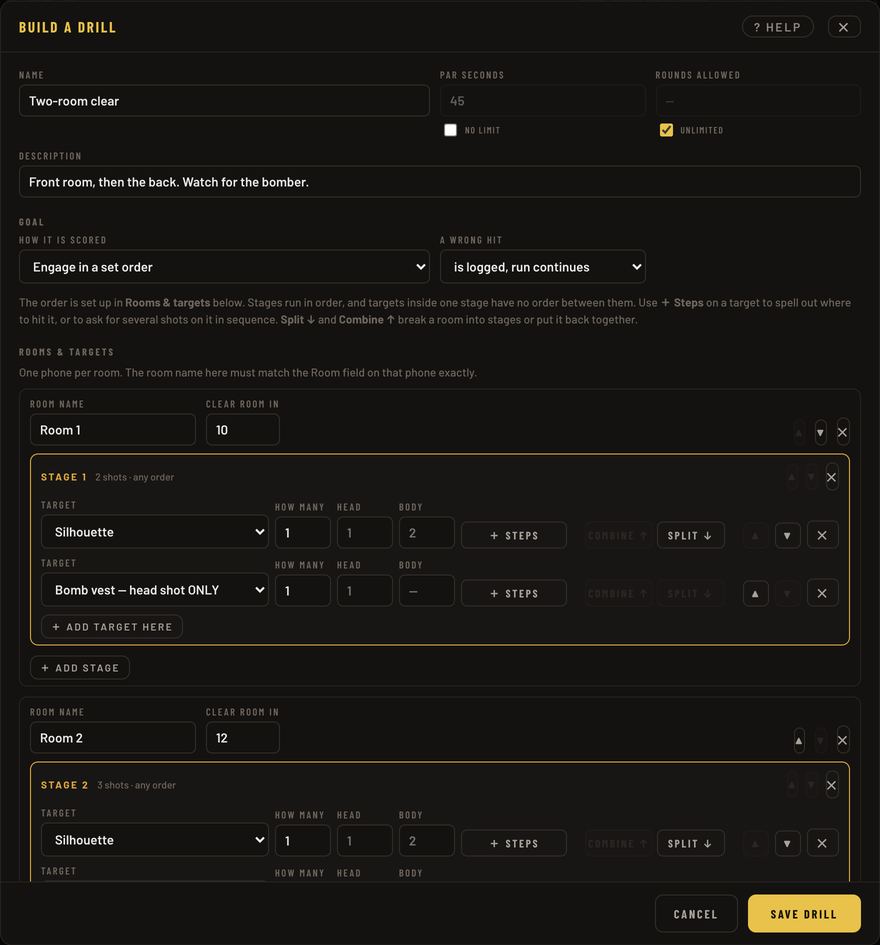
A room is one phone watching one part of your space. The room name here must match the Room field on that phone exactly — hits from a room the drill does not know are ignored, with no warning anywhere. This is the single most common reason a drill scores nothing.
Which is why the fastest way to fill this in is to let the phones do it:
- 📡 Build from phones
- Reads the rooms and targets your connected phones are reporting right now and fills them in — correct names, correct sheets, in the order the phone sees them. It adds to what is already there rather than replacing it, and everything it writes stays editable. Calibrate the phones first: it can only report targets that exist.
- ➕ Add room
- Type it by hand instead. You will need the room name to match the phone.
- 🎲 Random drill
- Fills the whole form with a generated course. Useful for a starting point, or when you want something you did not design and cannot anticipate.
Each target row is one printed sheet: which sheet it is, how many of them, and how many Head and Body hits put it down. Leave Head and Body blank to use whatever that sheet normally takes — the greyed number in the box is what that will be.
Clear room in sits on the room, not on each target: from your first scoring hit in that room, everything in it must be down within that many seconds. Blank means no limit.
Order: stages, Split and Combine
Under Goal you choose between:
- Neutralize every target — any order
- Clear the house however you like. Stages do not appear at all.
- Engage in a set order
- The drill becomes a sequence, and the room splits into stages.
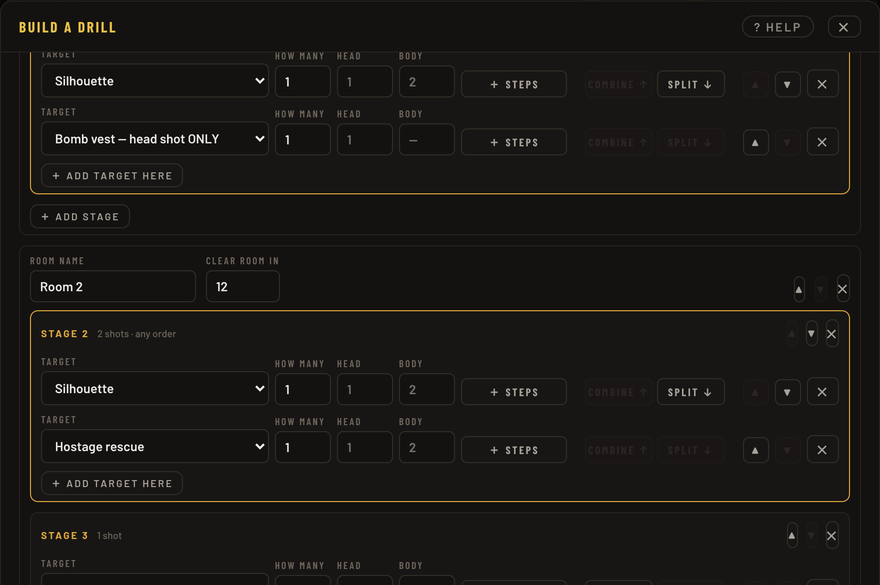
A stage is a step in that sequence. Stages run in order; targets inside one stage have no order between them. So a room imported from your phones arrives as one stage — “clear this room” — and you cut it into a sequence from there:
- Split ↓
- Starts a new stage under the row you press. Everything below that row in the stage moves into it. Press it on the second of four targets and you get “these two, then those two”.
- Combine ↑
- The opposite: moves that target up into the stage above it, joining the two. Press it enough times and the room is one stage again.
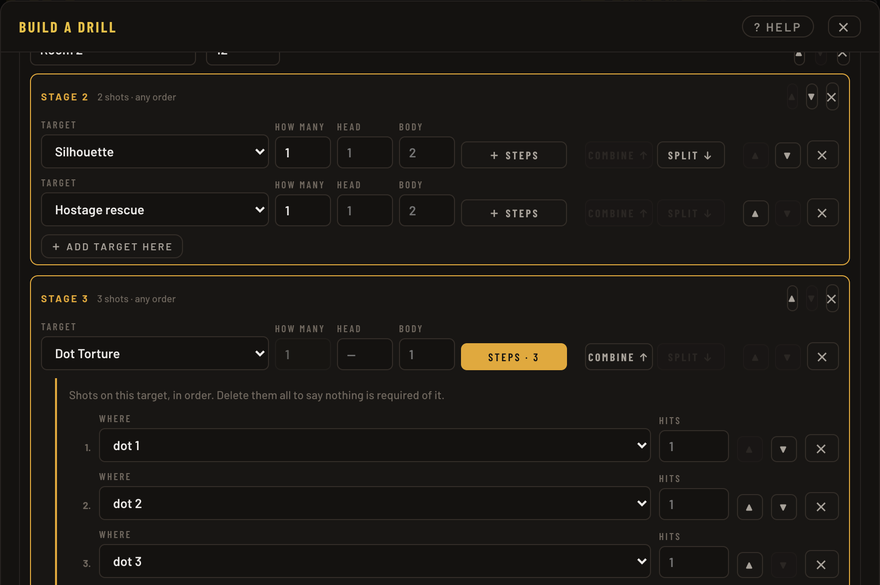
To ask for specific hits on one target — dot 1, then dot 2, then dot 3 — use ➕ Steps on that target’s row. That opens a shot list you can add to. Once a row has steps the button shows how many, and the row is pinned to a single sheet: a spelled-out order describes one piece of paper, so three sheets each with their own order is three rows.
Pressing Steps again removes the list. It asks first if there is anything in it.
Limits: par, rounds and reloads
- Par seconds
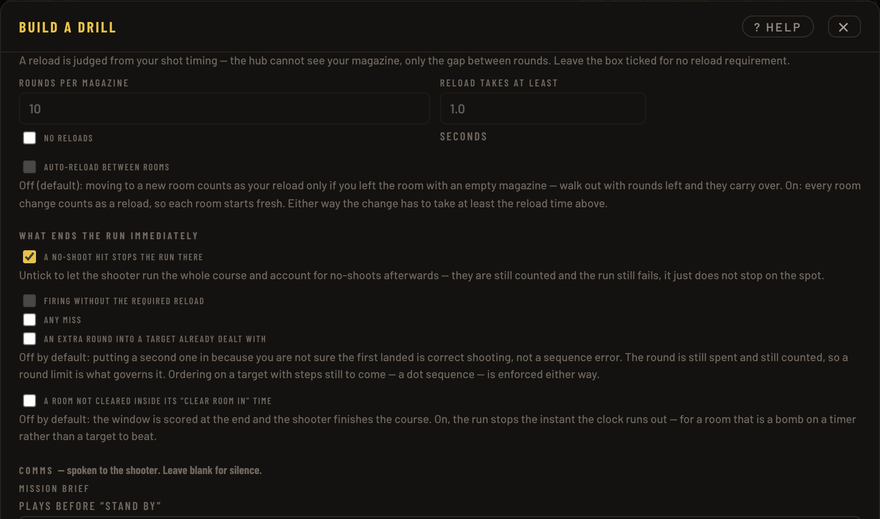
- A time limit for the whole run. Leave no limit ticked for an untimed drill.
- Rounds allowed
- A budget for the whole run — and a miss still costs one. Tight budgets are what force head shots rather than two body hits on everything; the builder tells you when a budget has done that.
- Rounds per magazine
- Sets up a reload. The hub cannot see your magazine, so a reload is judged from your shot timing: fire the magazine dry and it expects a pause of at least the reload time before the next round.
- Auto-reload between rooms
- Off by default, and off means moving to a new room only reloads you if you left the last one empty — rounds left in the magazine carry over. Ticked, every room starts fresh.
What ends the run
A no-shoot hit ends the run immediately. Untick that if you would rather the shooter finish the course and account for it afterwards. The rest are off unless you turn them on:
- Firing without the required reload — otherwise it is logged as a fault.
- Any miss — a hard standard; every round must land somewhere that scores.
- An extra round into a target already dealt with — off by default, because putting a second one in when you are not sure the first landed is a judgement call, not obviously a failure.
- A room not cleared inside its Clear room in time.
Before you arm
Once a drill is picked in the list, the hub checks it against what the phones are actually reporting and will tell you if they disagree — a room name that matches nothing, or a phone calibrated to a different sheet than the drill expects. Both of those score zero and look exactly like broken hit detection, so it is worth reading that panel before you shoot.
The Setup & rules panel prints the whole drill in plain language: which room needs which targets, what each sheet takes to go down, and the engage order room by room. That is the panel to read before you start, and the one to show the shooter.
Leaving the list on — free run — gives you an unscored session: hits plot on every room card, nothing is judged, and no drill has to be built at all.
Still stuck? Support & troubleshooting covers the things that usually go wrong first, or report a bug if something is genuinely broken.